Your own branded WordPress plugin, and a fallback when a client never answers a review

Each partner gets their own branded build of the WordPress connector from a new Settings tab. Written Content approvals can fall back to approved after a set number of days. Reports gain a Website toggle and per-section comparison switches.
A day for the white label: the plugin now looks like yours, and the approval flow gets a way to move on when a client does not answer.
For our partners
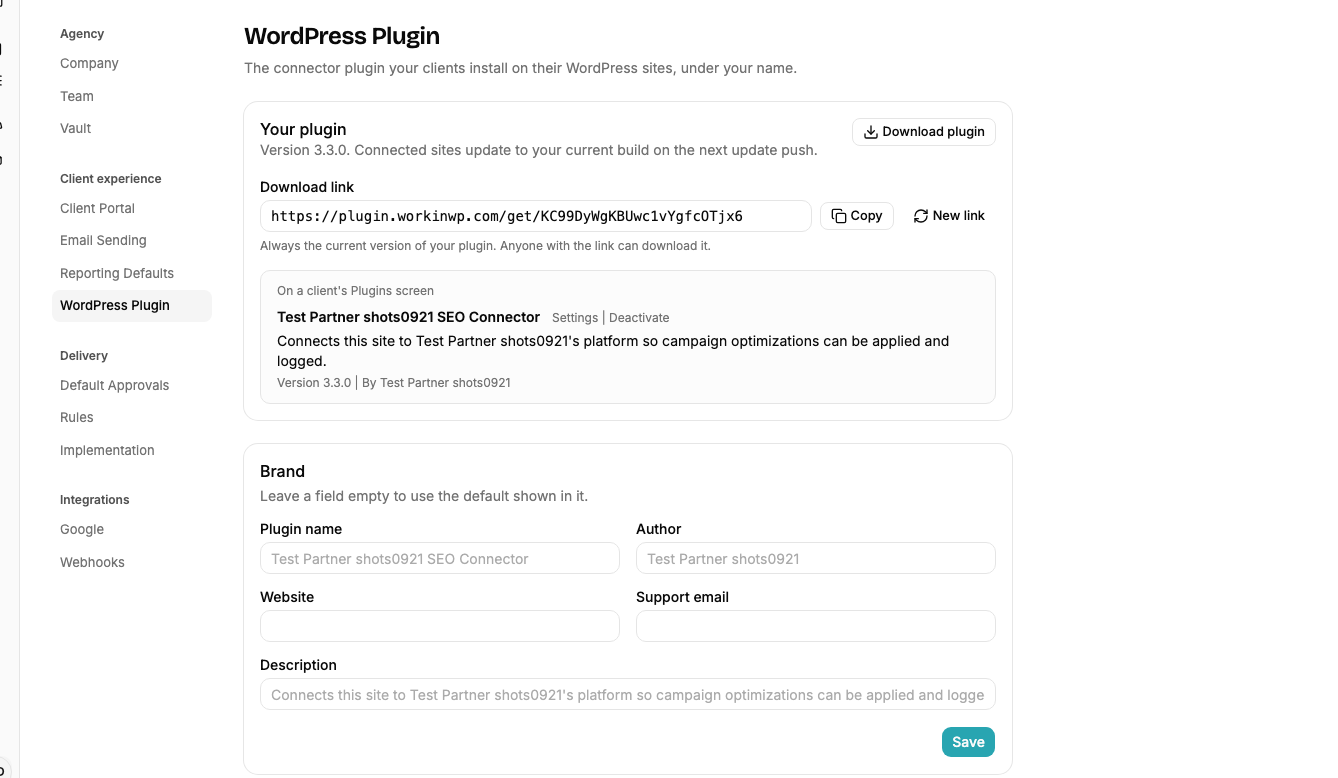
- Settings has a new WordPress Plugin tab: set the plugin’s name, author, website and support email, and download your own build of the connector. Every connected site runs your build.
- Written Content approvals get an optional fallback: if a client does not answer inside a set number of days, the platform approves the piece as is and proceeds. Off everywhere by default.
- Reports gain a Website toggle and per-section comparison switches, and anything hidden from the client’s report is now an amber banner listing everything hidden.
- Every filtered table works at phone width: the search stays inline and the dropdowns open in a Filters sheet, with an active-filter count and a Clear button.
- A content piece closed while its review was still out reads Pending approval on the planning page, not Published.
1. Your own WordPress plugin
The tab previews how the plugin reads on a site’s Plugins screen, and the account the plugin signs in with carries your team’s name.
2. Approval fallback
Partners who send content to clients for approval report that clients sit on reviews for months. Turn it on in Settings > Approvals with a number of days; a client can override or opt out on its own Approval rules. The platform asks first. The clock starts when the review was requested, a send-back resets it, only reviews opened after you turn it on qualify, and a reminder goes out two days before the window closes.
3. Report switches
The Website toggle lets a client with Analytics linked get a keyword-only report, and each KPI section has its own switches for the previous-period and year-over-year comparisons. The banner came from a partner who toggled Conversions off and on during a client call and could not tell whether it worked.

Behind the scenes
Every ranking an agent reads now carries the current time, when the keyword was registered, when it was last checked and how often it is checked, and every session opens with the time of day. The change came from an agent that raised an alarm that the rank tracker had returned no data two days after keywords were added. They had been added that morning; the agent had been started by hand four times within half an hour and treated each start as a new day. Escalations name the agent that raised them.
Get these updates by email
A short note when something changes on the platform, plus whatever else you pick.
Check your inbox to confirm your subscription.