Bulk client assignments from the Team page, and a rebuild of what agents remember

Assign a teammate to clients in one dialog, see whether every client's data is flowing, and read logins and webhooks as tables. Underneath, what agents remember about a campaign is now typed: facts, notebooks and events.
Thursday split between the settings pages partners live in and how campaign knowledge is stored.
For our partners
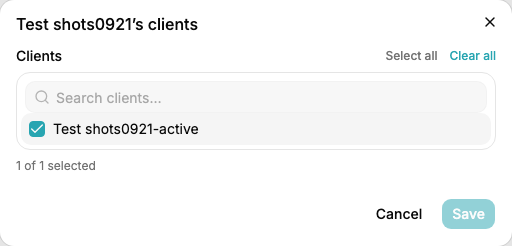
- Each member row on Settings > Team shows how many clients that person is assigned to; click it to move that teammate onto or off several clients at once.
- Integrations opens with a connected-data table, one row per client, showing which Google data is flowing. The Vault and Webhooks are tables too.
- Every rule is now a Rule, never broken, or Guidance, lean this way and say why when you do not.
- Notes & feedback is open to every partner; a note the review finds nothing in closes itself, and one that changed nothing can be deleted.
- Review threads show every comment in full.
1. Client assignments from the Team page
The checklist is searchable and lists your active clients: one save instead of a visit to every client’s Team tab.
2. Integrations tables
Each row names the Search Console, Analytics, Business Profile and Ads property and the Google account each rides on. Company access accounts now show read-only; when the accounts were ours the page could not answer what a partner opens it for, is my clients’ data flowing.
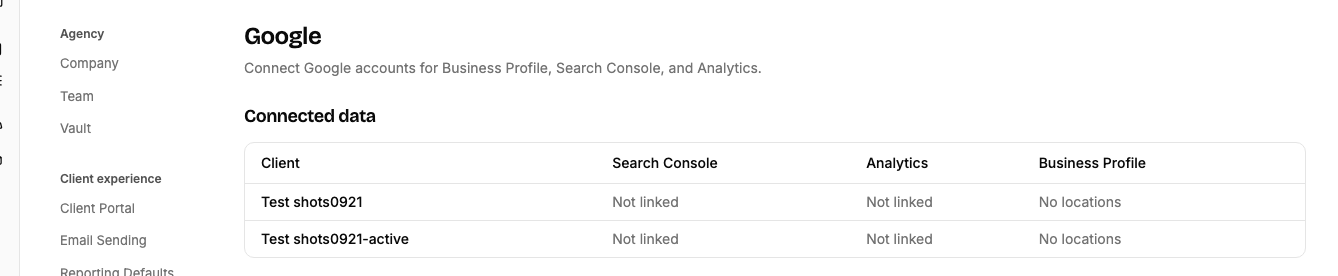
The Vault is one row per campaign with its CMS and access state (connected, login on file, connection broken, none), and Webhooks is one row per event, edited one at a time, with a status.
Behind the scenes
- What agents keep about a campaign is now typed: facts, notebooks and events.
- Connected sites on a WordPress host that only allows plugin updates from inside its admin now take connector updates that way.
- Agents can be scoped to run everywhere except named partners or campaigns.
1. Facts, notebooks and events
Facts are dated, sourced rows about the business and the site, and a fact a person states cannot be corrected by an agent. Each agent has its own notebook in place of a daily handoff log. Events record what changed and why. The existing memory was sorted into those three, the results read, and the rules corrected twice: strategy lifted from an old goal never becomes guidance, and a fact never restates something the platform already holds.
A strategist’s comment had gone into a campaign’s shared memory with “keep flagging this every time until removed”, and every agent on that campaign obeyed it, including ones with no business acting on it. Memory was shared by every agent and never expired, and most of it had become instructions to whichever agent came next.
Get these updates by email
A short note when something changes on the platform, plus whatever else you pick.
Check your inbox to confirm your subscription.