White-Label SEO Reporting: Reporting for Your Clients With Your Brand

What a white-label SEO report should contain, what to check before you trust a platform's branding, how much control you should have over what each client sees, the delivery options, and where the platforms fit. With examples.
The reporting layer is where most white-label SEO partnerships fall apart. Either the report is generic and unconvincing, or it leaks the fulfillment partner’s branding everywhere, or it shows the wrong metrics for the person reading it. Each failure produces a different kind of client unhappiness, and all of them undermine the agency’s positioning.
This guide covers what white-label SEO reporting is, what should be in the report, what “branded” actually has to mean, how much control you should expect over what each client sees, how the report should reach the client, and the platform options. Where a screenshot makes a point faster than a paragraph, I’ve used examples from the reporting we run for partner agencies, shown with a demo agency and a stand-in client so nothing real is exposed.
What white-label SEO reporting is
The use of third-party software to deliver SEO reports to clients under the agency’s brand. The platform pulls data from Google Analytics, Google Business Profile, rank tracking, crawl data and link data, then presents it in a branded dashboard or PDF that appears to come from the agency rather than the underlying tool.
Two parts of the work matter, and they fail independently.
Data aggregation. Pulling the right metrics from the right sources, on a schedule, without someone exporting CSVs on the first of the month. A report missing an obvious metric signals the agency doesn’t know what matters.
Presentation and branding. The report has to look like the agency’s other deliverables. A third-party template with a logo swapped in reads as exactly that.
When both work, the reporting layer becomes invisible (the client sees “the agency’s report”) and reinforces the agency’s positioning. When either fails, it actively damages the relationship.
What clients actually want in a report
Different readers want different things, and the report should anticipate who is opening it.
Business owners and executives want bottom-line metrics: organic traffic direction, conversions attributed to organic (form fills, calls, bookings), local visibility if they’re a local business, and a plain-language read on what’s happening and what’s next. Less is more. A short summary plus an appendix beats a forty-page deep dive that nobody reads.
Marketing managers want more tactical detail because they have to defend the work to their boss and reconcile it with other channels. Specific keyword movements with context, top-performing content, technical health, link changes, and next-period focus.
SEO-savvy clients want to verify the work is happening at the depth they’re paying for. Tactical work shipped this period, crawl data, detailed keyword tracking, and link acquisitions with quality noted.
A well-structured report serves all three at once. The summary and the “work delivered” section carry the executive. The section detail carries the manager. The keyword table and crawl history carry the skeptic.
What should be in every report
Regardless of audience, seven sections make up a complete white-label SEO report. Whatever platform you use, check it can produce each of these, and check what it looks like.
Website performance
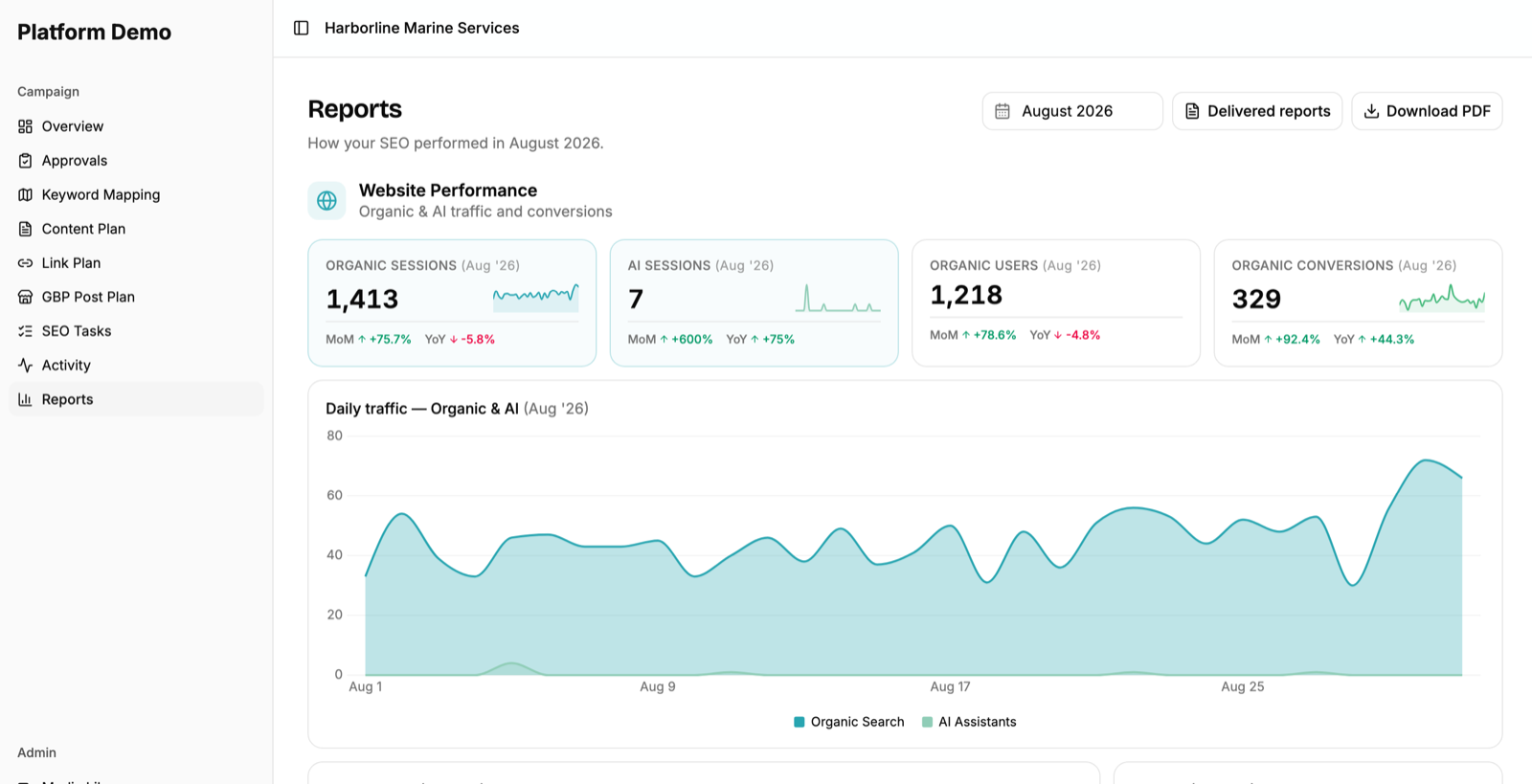
Organic sessions, organic users and organic conversions from Google Analytics, each with month-over-month and year-over-year change. A daily traffic chart for the period, a conversions chart with the breakdown by type (form submission, phone call, booking, email click), and a six-month trend with the same six months a year earlier drawn as a comparison line.
One addition that has become non-negotiable: traffic from AI assistants as its own channel. Clients are asking about it. If the report doesn’t separate AI-referred sessions from organic search, the agency looks behind.
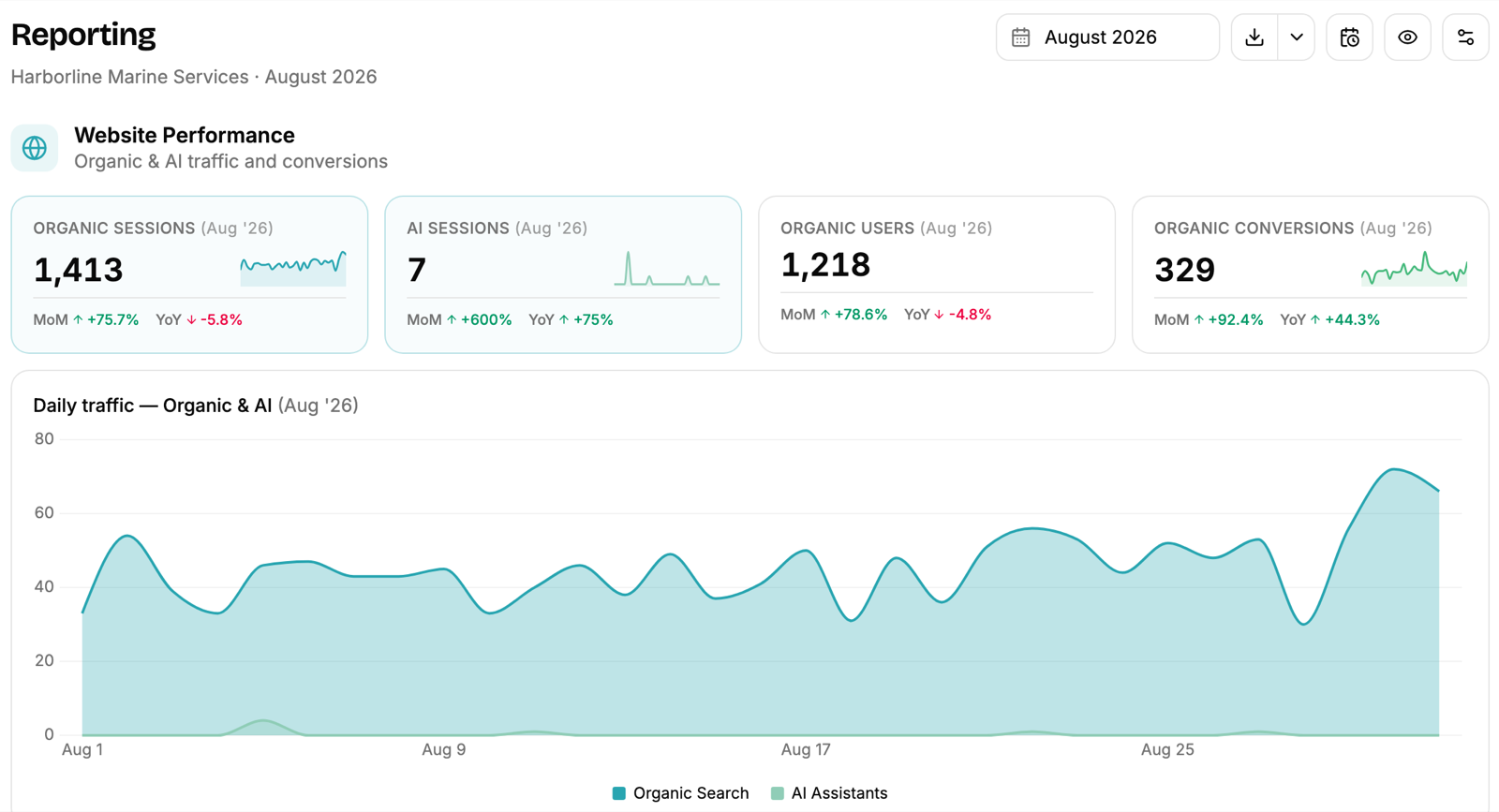
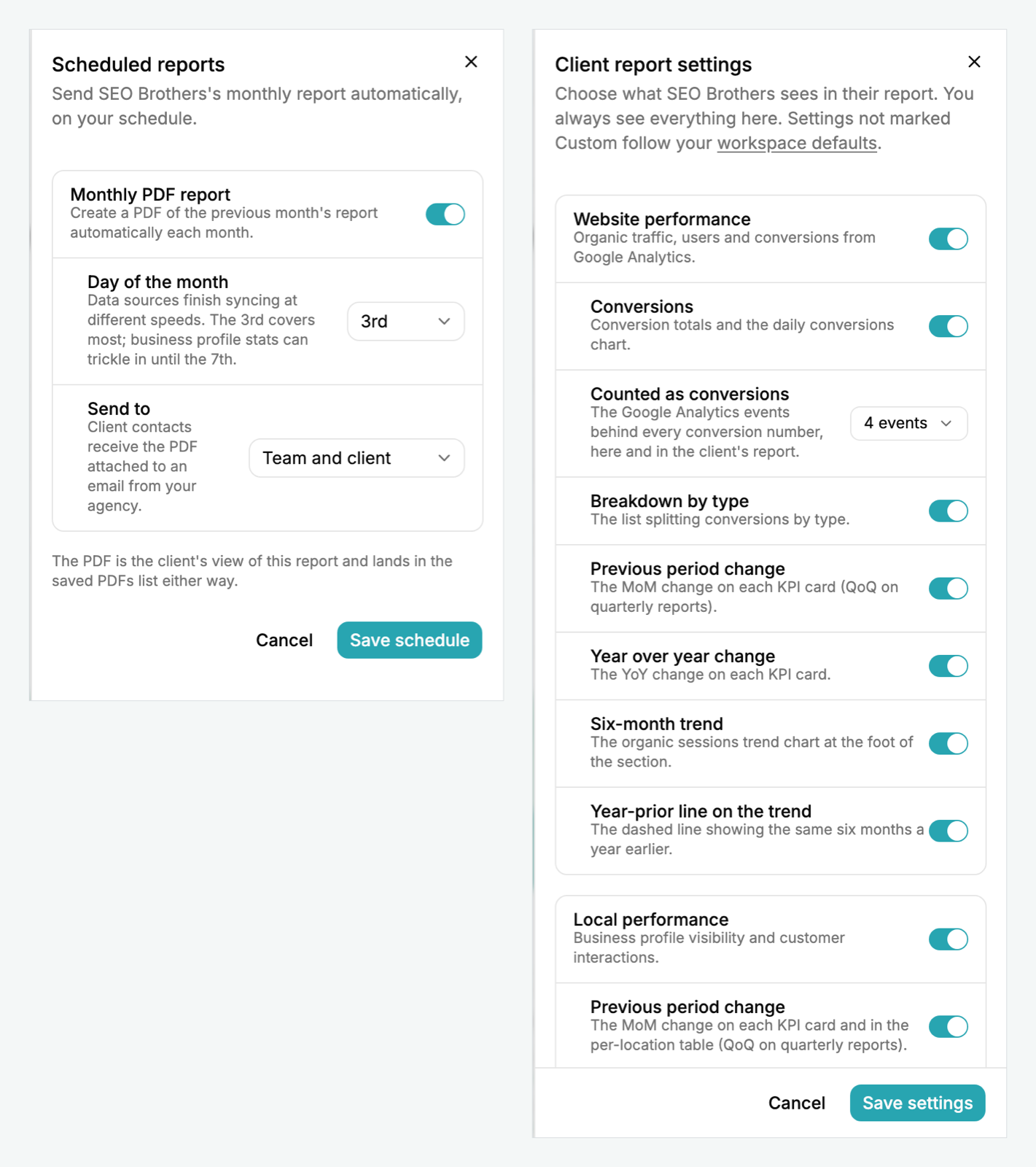
Check what counts as a conversion. The number is only as good as the analytics events behind it, so the platform should let you choose those events per client and keep the list short. A client who sees “conversions” and finds out later it included scroll depth stops trusting the whole report.
Google Business Profile
For local businesses this section often matters more than the website one. Total impressions, calls, website clicks and direction requests with period-over-period change. Impressions split by surface (mobile search, desktop search, mobile maps, desktop maps) so the client can see where they’re actually being found. A per-location table for multi-location businesses, and a six-month trend.
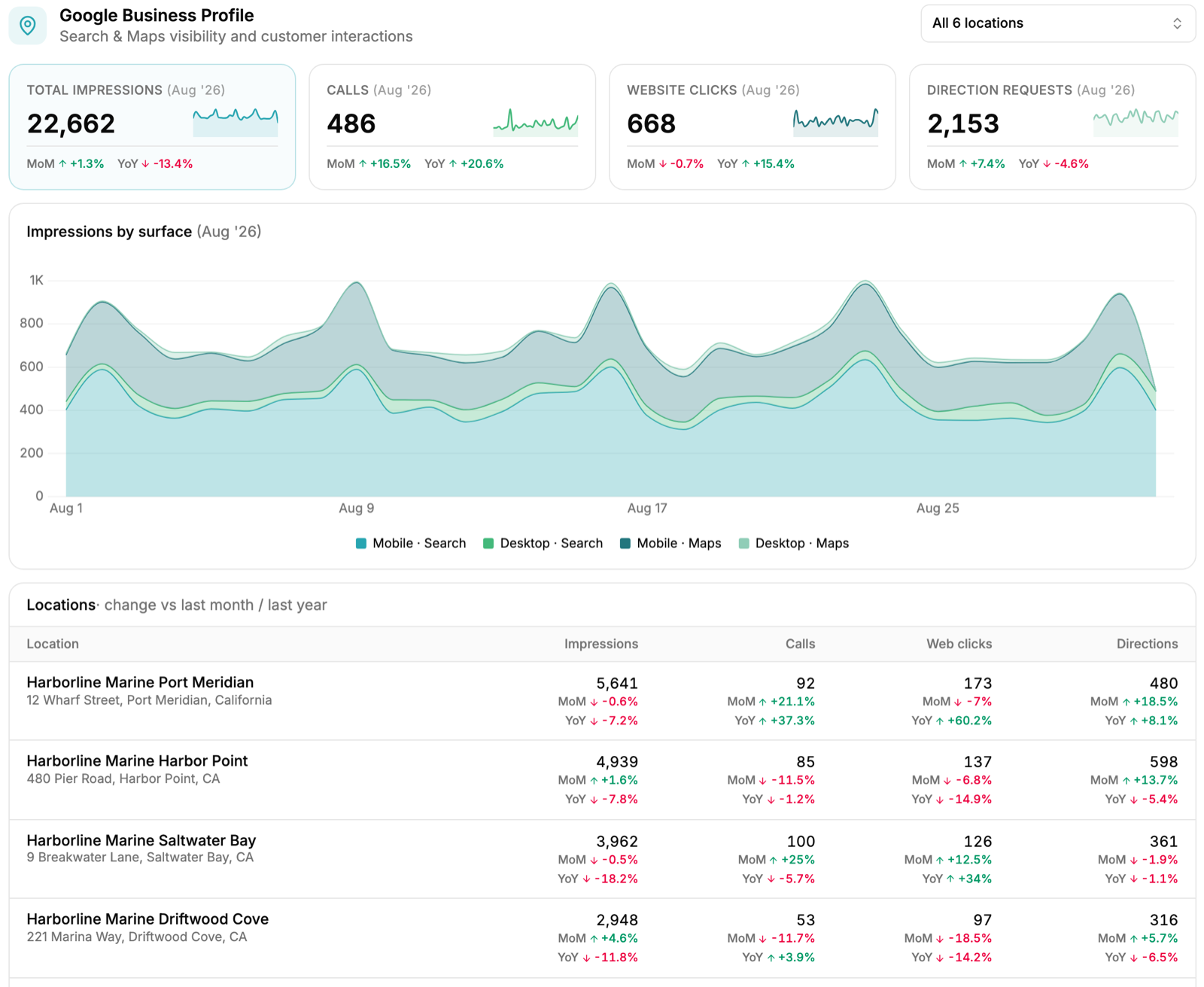
One thing to know: Google’s Business Profile performance data trails by roughly a week. A report generated on the first of the month will under-count the last few days. Any platform that schedules PDFs should let you pick a later day of the month for that reason.
Keyword visibility
Tracked keyword count, distribution across positions 1 to 3, 4 to 10 and 11 to 20, a multi-month view of how many keywords sit in the top twenty, and then the full table: each keyword, its tracked location, current position, change this period. The two columns most reporting tools skip: whether the local pack triggered for that query, and whether an AI Overview appeared. Both change what a position means.
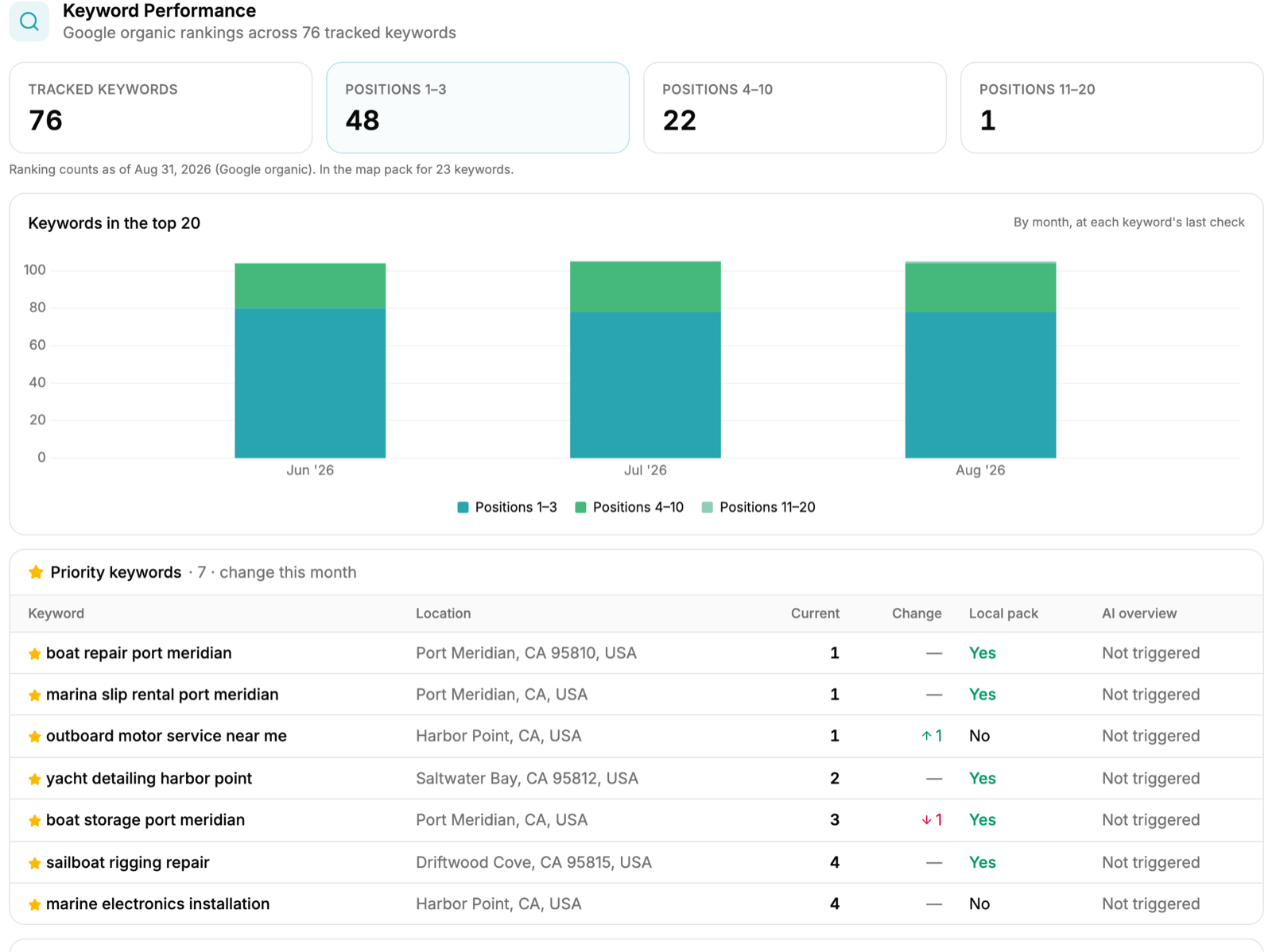
Report the change, not just the position. A client can’t tell whether position seven is good news without knowing it was nineteen last month.
Technical health
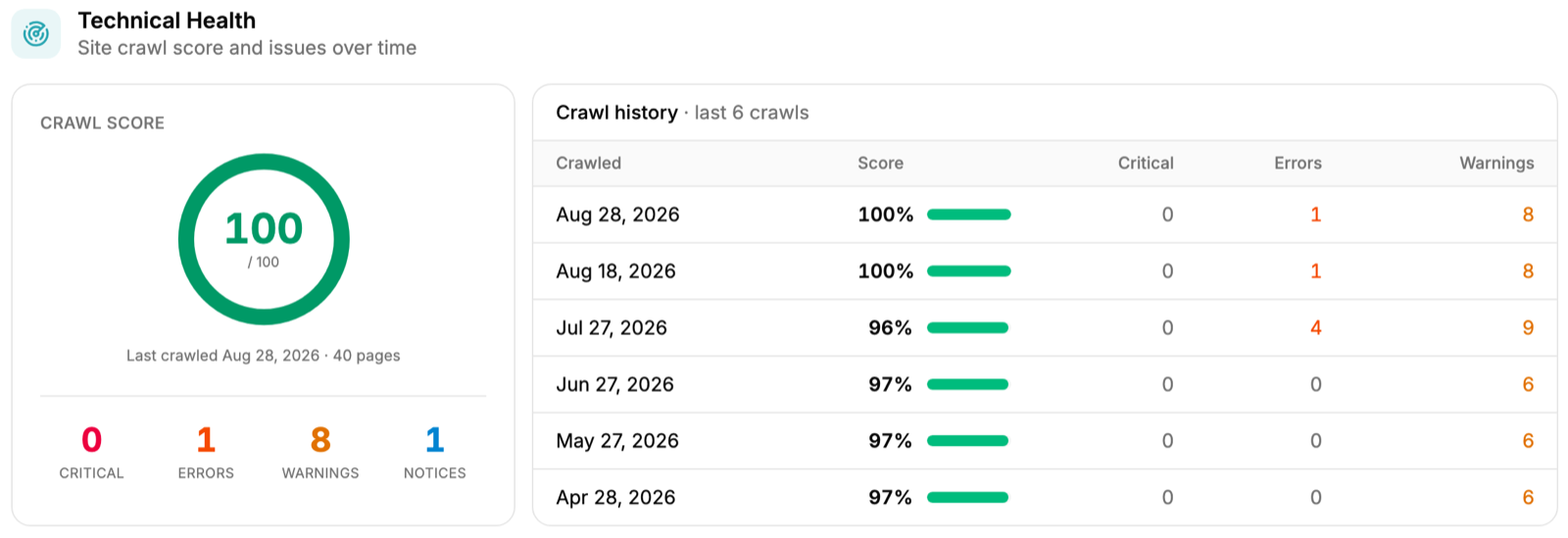
A crawl score for the site, counts of critical issues, errors, warnings and notices, and a history of recent crawls so the client sees whether the trend is improving. This is the section that proves maintenance is happening. It also protects the agency when traffic dips for reasons outside SEO: a clean crawl history is evidence.
Link profile
Domain rating, referring domains, and organic traffic and keywords as a snapshot. Total backlinks is a vanity number and doesn’t belong here. Referring domains does.
Work delivered
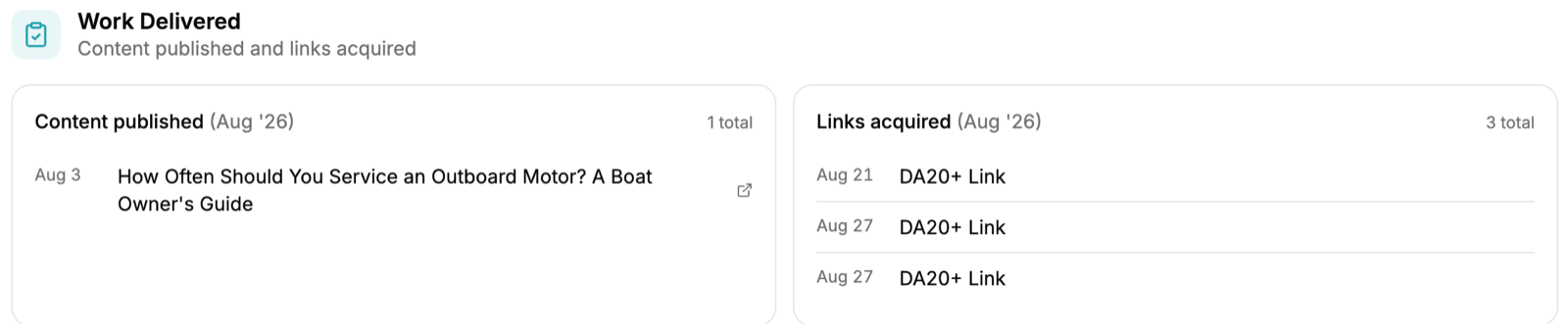
Content published and links acquired this period, with live URLs. This is often the section the client most wants to verify, and it’s the one most standalone reporting platforms can’t produce because they don’t know what work was done. A report that shows movement without showing the work behind it invites the question “so what did you actually do?” When AI agents do part of the delivery, this section matters even more. Our guide to AI agents for SEO explains how agent-filed work gets approved before it counts as delivered.
AI visibility
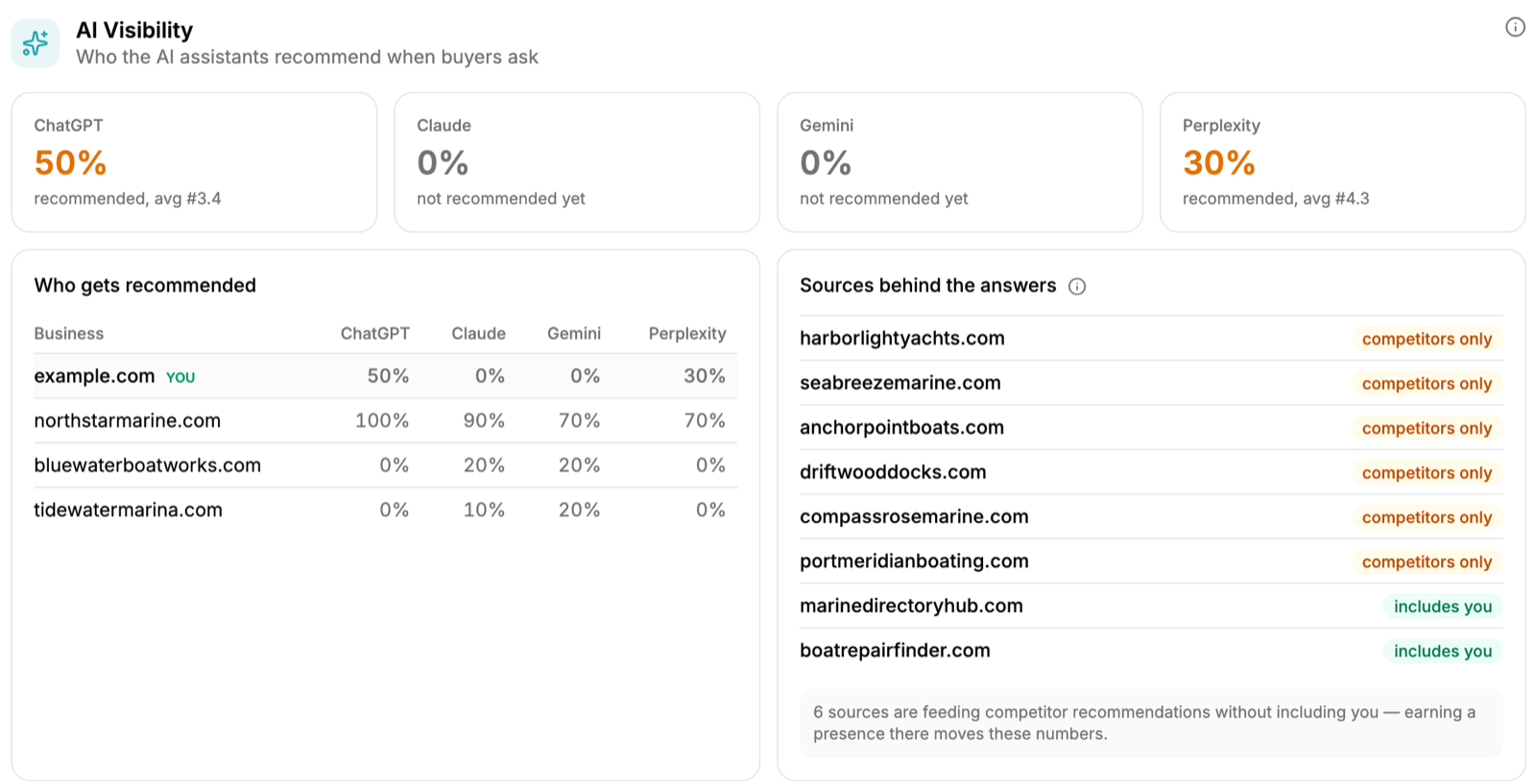
How often the AI assistants (ChatGPT, Claude, Gemini, Perplexity) recommend the client when a buyer asks the kind of question the client wants to win, which competitors get recommended instead, and which sources the assistants draw their answers from. This is a monthly snapshot rather than a daily track, and for most local businesses the number starts at zero. That’s fine. Reporting zero honestly and then showing it move is more convincing than not reporting it at all.
Optional but valuable
Paid advertising (spend, clicks, conversions, cost per conversion) where the agency runs both channels, and call tracking (total, answered, missed, first-time callers) where the client has it. Both are possible in the reporting we run for partners and are rolling out to a smaller group first. Search Console impressions and clicks are useful context too, though most of what they tell you already shows up in the keyword and traffic sections.
The mistake to avoid is pulling every metric a tool produces and dumping it into the report. Density doesn’t equal insight. Curated metrics with explanation outperform comprehensive dumps.
Branding considerations
The branding decision is binary: the report is either branded for the agency, or it’s not. There’s no middle ground that works, and the places the vendor leaks through are always the same: the URL, the sender address, the login page, and the PDF footer.
Before trusting a platform’s “white-label” claim, check every one of these.
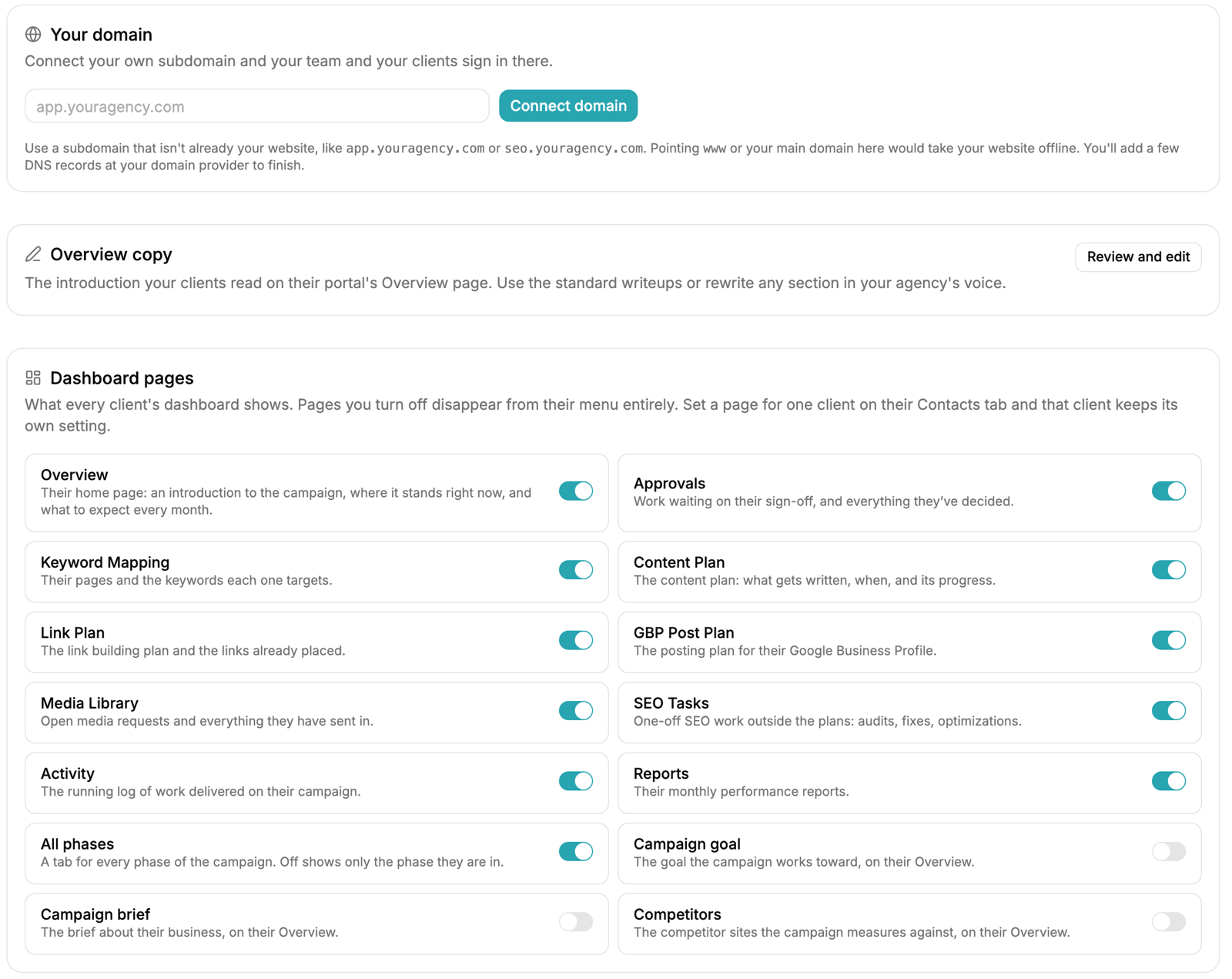
The domain. The client portal and every report link should live on the agency’s own subdomain (app.youragency.com or similar), not the vendor’s. That should be one DNS record, and the agency’s own team should be able to sign in there too. A “white-label” platform that still sends clients to vendor.com/report/12345 has failed the test before the client opens the report.
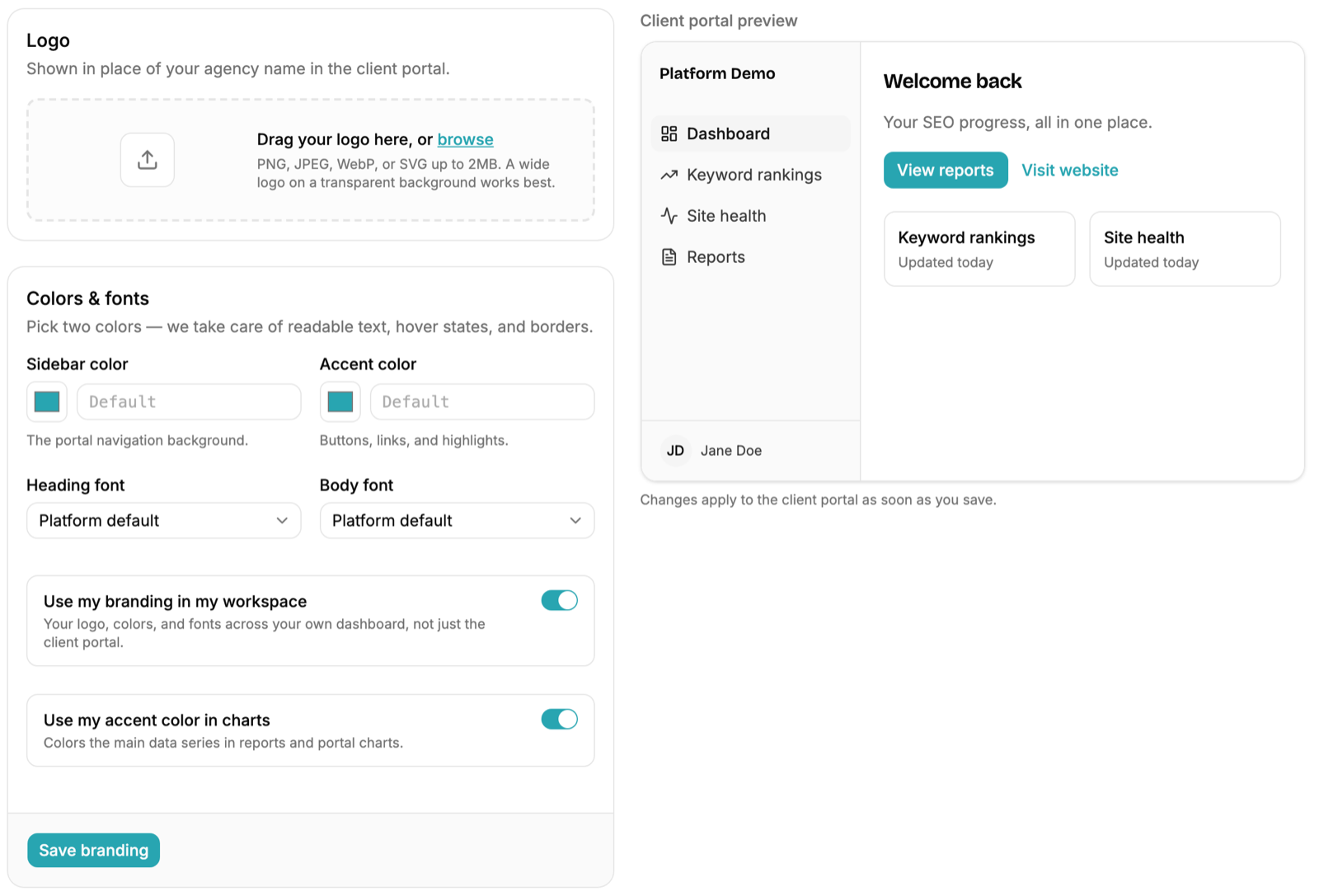
Logo, colors and fonts. The agency logo in place of the vendor name, at minimum a navigation color and an accent color, and ideally a heading and body font. Check whether the accent color carries into the charts in the report, not just the navigation. Most platforms stop at the logo.
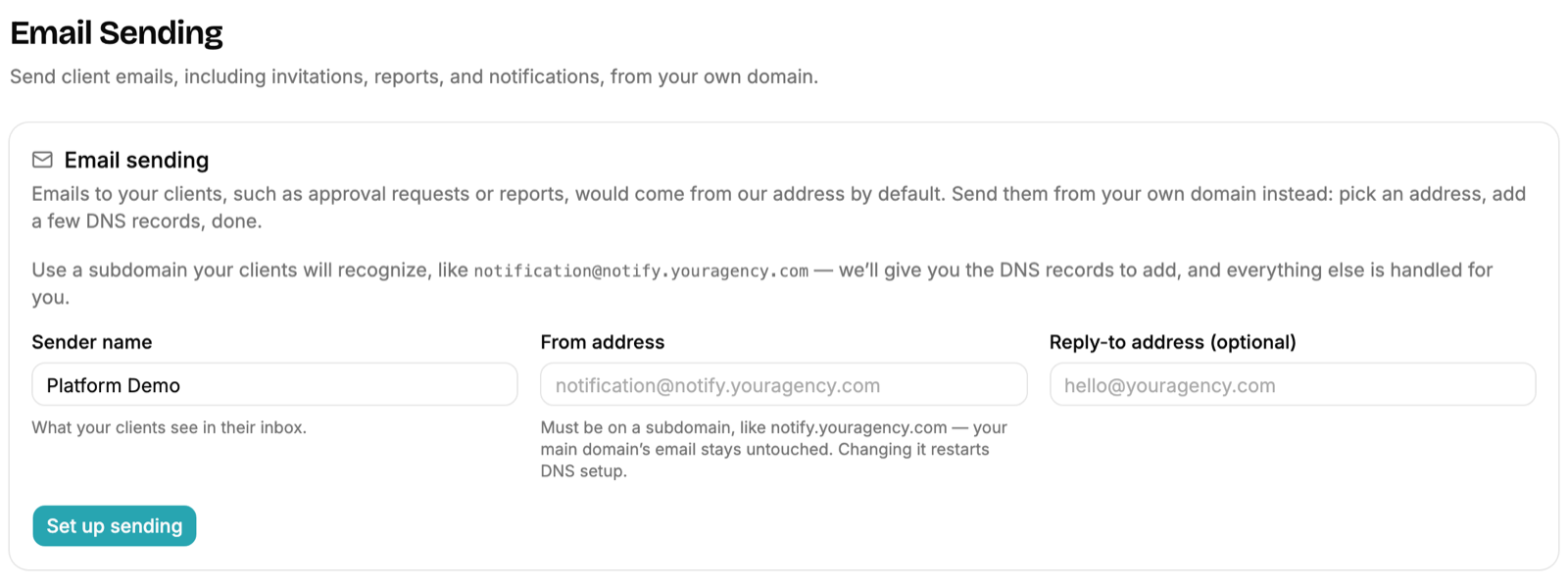
The sending domain. Report emails, approval requests and portal invitations should go out from the agency’s own address on a subdomain ([email protected]), with the agency’s sender name and reply-to. Ask what happens before the DNS records verify. The acceptable answer is “under your agency name from a neutral address.” The unacceptable one is “from our address.”
The login page and the PDF. The client login page should carry the agency logo and copyright with no signup link back to the vendor. The PDF cover should carry the agency logo and “Prepared by [agency],” with the client name and period in the footer of every page. Search the PDF for “powered by.” If it’s there, so is the vendor.
The portal copy. The introduction the client reads on their dashboard, describing where the campaign is and what to expect each month, should be editable in the agency’s voice. Standard writeups are a fine starting point, but the client is paying the agency, not the platform.
What’s worth investing in. A template configured once and reused. A consistent methodology section. A branded subdomain. For agencies whose positioning depends on premium presentation, a fully custom report (designed in-house, populated from API exports) may be worth it, but most agencies don’t need that. Good platforms now support enough branding for typical client expectations, and branding shouldn’t cost extra.
Control over what each client sees
A fulfillment partner sees everything. The client should see what the agency decides they should see, and that decision has to work at two levels: defaults for every client, and overrides for one. This is the part of white-label reporting most agencies don’t think to ask about until a section they didn’t want lands in a client’s inbox.
Report sections. Every section and most sub-elements should toggle. Show conversions but not the breakdown by type. Show month-over-month change but hide year-over-year for a client whose last year was a mess. Drop the year-prior line on the trend chart. Hide the link profile for a client where link work hasn’t started. And sections with no data yet should drop out of the client’s report on their own without anyone touching a switch.
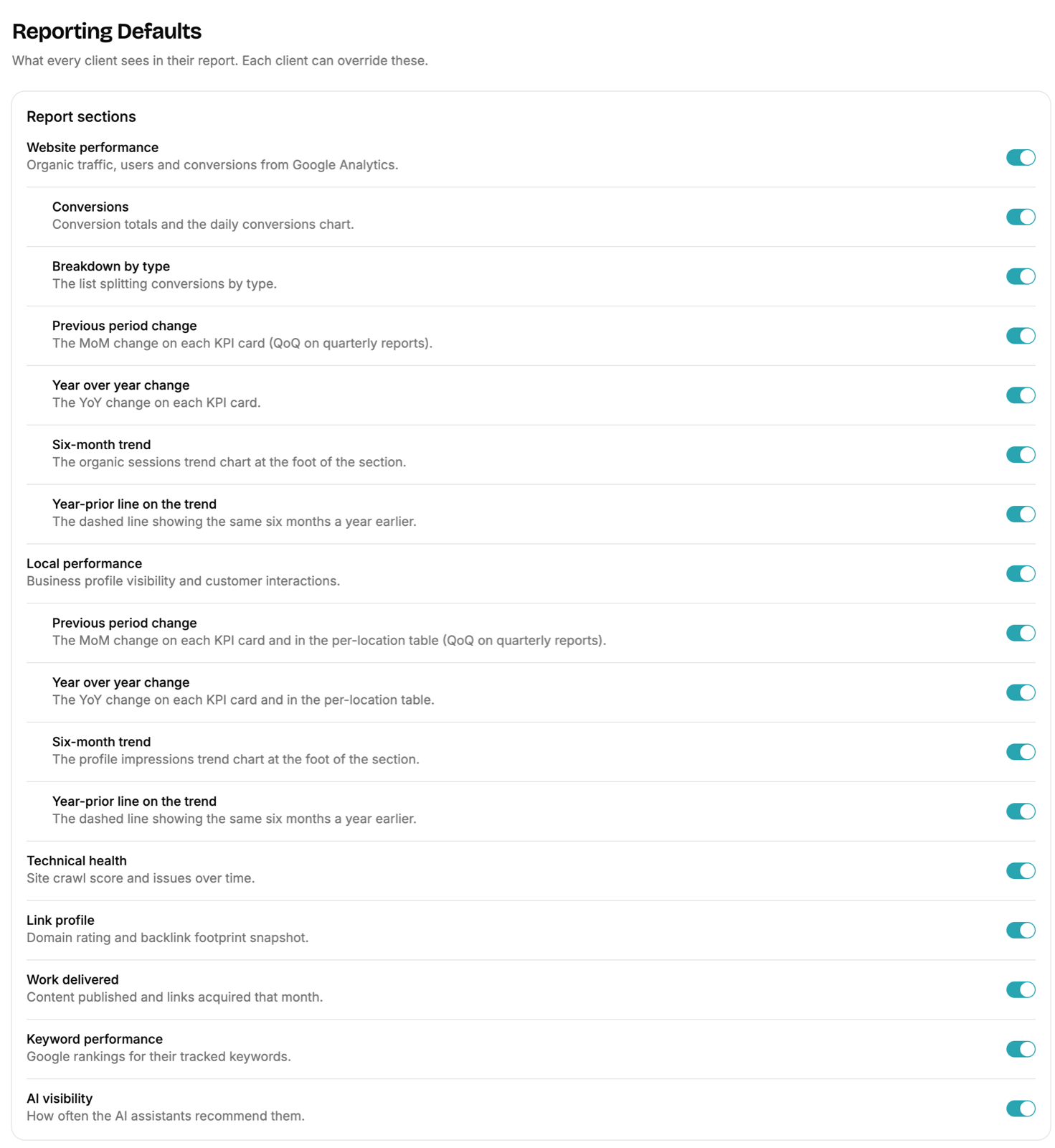
Per-client overrides. The defaults apply everywhere, and any one client can differ. The same per-client panel should also set which analytics events count as a conversion for that client, since that varies by business.
Portal pages. The report is one page of the client’s portal. The others (approvals, keyword mapping, content plan, link plan, Business Profile posts, activity log, and so on) should each switch on or off per workspace and per client, and a page that’s off should disappear from the client’s menu entirely rather than sit there empty.
View as client. Before anything goes out, the agency should be able to open the portal exactly as the client will see it. Guessing what a toggle did is how a hidden section ends up in a PDF.
How the report reaches the client
Three delivery modes cover nearly every client. The thing to check is whether they all run from the same underlying report, because a dashboard that disagrees with the PDF is worse than either alone.
A monthly PDF, on a schedule. Generated automatically on a chosen day of the month, emailed from the agency’s own address with the PDF attached, to every contact on the client. The subject line should read “Your August SEO report,” not “Report #4471 from [vendor].” Look for the option to send the PDF to the agency’s own team first, so the account manager can review it and forward it with a note. Every generated PDF should land in a saved list for both the agency and the client.
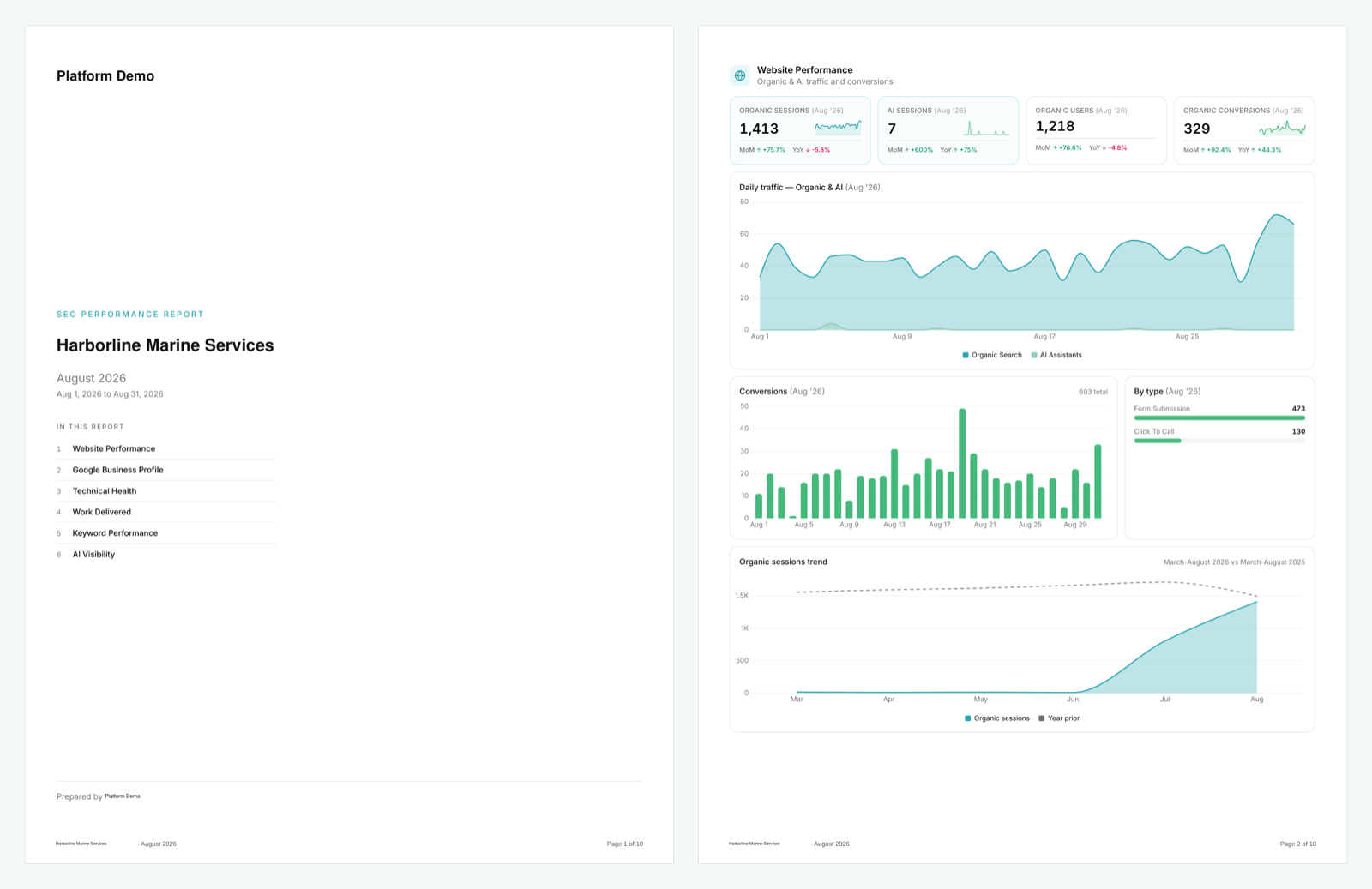
A live portal. The same report on the client’s own login, with a period picker. Monthly by default, and a quarterly view for the clients who prefer to zoom out. A download button for the client who wants to forward the PDF internally.
A public link or embed. Some clients won’t log in to anything. A tokenized link that opens the whole portal on one page with no login, optionally behind an email prompt, and can be embedded in another tool the agency already uses with the client. The agency should be able to rotate or turn off the link at any time.
Reporting cadence
Monthly reports for ongoing SEO retainer work. Enough time passes for meaningful movement, the cadence aligns with most clients’ financial reporting, and it sets the rhythm for the strategy conversation.
Quarterly business reviews layered on top of monthly reporting. Year-over-year context, roadmap discussion, and the renewal conversation follow naturally. The quarterly report should be the same report with quarter-over-quarter deltas, not a separate deliverable someone builds by hand.
Real-time dashboards as a secondary layer for clients who want to check in between reports. Useful for sophisticated clients, lower-leverage for clients who would rather get the curated monthly report.
The trap: weekly client reports. SEO movement over a single week is mostly noise, and a weekly report creates the impression that nothing is happening or that the agency is constantly reacting. Weekly checks belong to the agency’s team, not the client’s inbox.
Report structure that works
A consistent structure across reports makes them easier to read over time.
- Summary. The period’s key wins, key concerns, and what’s coming next. The most-read section by a wide margin.
- Website performance. Traffic, conversions, AI-referred traffic.
- Local visibility. Business Profile impressions and actions, for local businesses.
- Keyword visibility. Distribution, movement, and the full table.
- Technical health and crawl history.
- Link profile.
- Work delivered. What was actually done this period.
- AI visibility.
- Next period focus and recommendations.
Consistency matters more than the exact order. Clients learn where to look for what they care about, and comparison across periods gets easier.
Commentary: who writes the story
Numbers without interpretation are a spreadsheet. The agency’s value-add is the analysis, so some layer of the reporting has to answer “what does this mean and what’s next.”
Be careful with platforms that auto-generate commentary into the client’s PDF. Generic AI narration under an agency’s logo is worse than no narration, and clients notice when the paragraph could have been written about anyone. What you want is control over how the narrative gets added, in the agency’s voice, in the place the agency chooses.
Three places it can live:
A note from the account manager when the report goes out. Two paragraphs covering the win, the concern, and the focus for next month, written by a person who knows the account. This is the highest-leverage option and the one most agencies skip.
A running activity log the client can see: what was done on the campaign, in plain sentences (content written, links placed, audits run, tasks completed). It answers the “what did you do” question every day of the month, not just on report day.
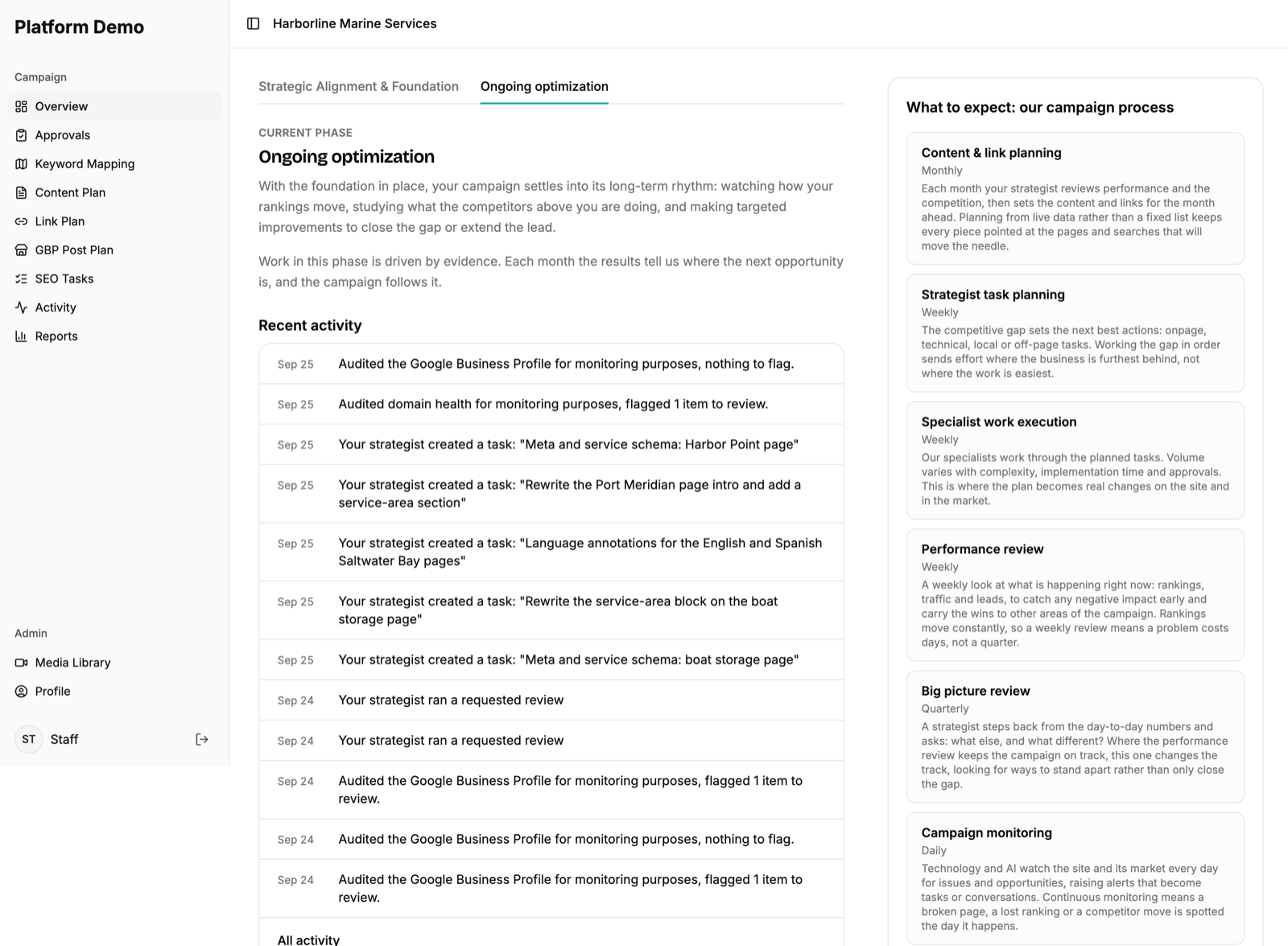
The portal introduction, describing where the campaign is and what to expect each month, rewritten once in the agency’s voice and then maintained.
Any of the three beats a paragraph generated by a model that doesn’t know the account. All three together is what a client who has never met the fulfillment partner should experience.
Popular white-label reporting platforms
A few options we’ve used or evaluated, with notes on positioning.
AgencyAnalytics
Strong custom dashboard and report builder, a wide integration list (GA4, Search Console, Business Profile, Ahrefs, Semrush, CallRail, ad platforms), white-label including a branded URL, and a site audit built in. We ran on it for years. Pricing scales by campaign count, from roughly a hundred dollars a month for small agencies to several hundred for larger setups. Verify current pricing on their site.
Looker Studio (formerly Google Data Studio)
Free and infinitely customizable, with connectors for most sources. The trade-off is build time: you’re constructing every dashboard yourself and maintaining it when a connector breaks. Cost-effective for agencies willing to invest the hours.
BrightLocal
The specialist for local-only reporting: citations, Business Profile, local pack visibility. Strongest for local, thin for everything else.
Rank Ranger (now Similarweb Rank Ranger) and Raven Tools
Enterprise-tier and mid-tier alternatives respectively. More configuration, steeper learning curves, comparable output.
Your fulfillment partner’s platform
If you use a white-label SEO partner, ask whether their platform reports under your brand and run it through the checks above. The advantage is that it knows what work was done, which is the section standalone tools can’t produce. The risk is the same as with any platform: a branding leak, or less control than you need over what each client sees. Ask to see the report as a client would, with your branding on it, before you commit.
The choice between platforms isn’t usually about features. All of them can produce a decent branded report. It’s about which one matches your workflow and how much control you need.
When to do reporting yourself
Most agencies should use a platform. There are scenarios where in-house reporting makes sense.
- Premium positioning. Agencies whose pricing requires the report to feel completely bespoke may need design quality beyond what platforms support out of the box.
- Custom data sources. When the reporting needs to integrate proprietary data (a CRM, custom call tracking, an internal performance model), a custom build often handles it better.
- Very high client volume. At extreme scale, custom-built reporting can be cheaper than per-client platform fees.
- Reporting as the product. The agency wants to differentiate on the report itself.
For most agencies, the platform approach wins. The investment to match a good platform’s output in-house substantially exceeds the platform fees.
Common reporting mistakes
Tool-output dumps. Pasting raw Ahrefs or Semrush exports into the report instead of curating and contextualizing.
No commentary anywhere. Numbers without interpretation, in the report or around it.
Inconsistent structure. Different report shapes month to month. Clients lose track of trends.
Vanity metrics. Total backlinks instead of referring domains. Total keywords instead of high-value keywords. Total traffic instead of converting traffic.
Hidden bad news. Burying ranking declines or traffic drops. Clients always notice eventually, and the discovery costs more trust than the drop did.
Over-promising next period. Aggressive commitments that don’t materialize. Under-promise.
Generic reports. Same template, same commentary, different client. It takes one shared inbox for two clients to compare.
Vendor leaks. A vendor URL in an email, a vendor login page, a “powered by” footer. Any one of them undoes the rest.
How we approach white-label SEO reporting at SEO Brothers
Every campaign we run for a partner agency reports through our own platform under the partner’s brand: their domain, their logo and colors, their sending address, and their choice of what each client sees. The report is the seven sections above, delivered as a scheduled PDF, a live portal, or a public link, with a quarterly view on the same data. The activity log runs continuously, and the narrative stays with the partner: their note, their voice, their call on where it goes. Branding is included on every plan, not an upsell.
The goal in every case is the same: the report looks like the agency produced it, the metrics matter to the client, and the story around the numbers comes from the person who knows the account.
Want to see it with your branding on it? Book a call and we’ll walk through a live report, or read about how the rest of the white-label SEO engagement works.
Get our guides in your inbox
Pick what you want to hear about. No spam, unsubscribe anytime.
Check your inbox to confirm your subscription.